
Registered Nonprofit
501(c)(3) certified
Community Partner
Senior Services Alliance
600+ Graduates
Since 2018
ADA Compliant
Accessible for all
Technology Education for Older Adults
Connection Begins
With Understanding.
Former teachers, healthcare workers, and lifelong learners — all discovered that digital skills aren't reserved for the young. Through patient, hands-on instruction in small groups, we've helped hundreds of seniors rediscover their confidence.

She learned to video chat and finally saw her great-granddaughter take her first steps.
"I used to think technology was passing me by. My mentor sat with me for three sessions just to make sure I felt comfortable. That patience changed everything."
— Eleanor WhitmanWeekly family video calls
Eleanor now connects with her daughter in Colorado every Sunday, watching her great-granddaughter grow up from miles away.
8
Weeks to independence
0
Prerequisites needed

He booked his own flight to his grandson's wedding in Hawaii.
"I designed bridges for decades, but I felt lost at a computer. The instructors never made me feel inadequate. They just showed me the way, step by step."
— James NakamuraIndependent travel planning
James researched flights, selected seats, and checked in online — all without assistance. He even helped his wife do the same.
8
Weeks to independence
0
Prerequisites needed
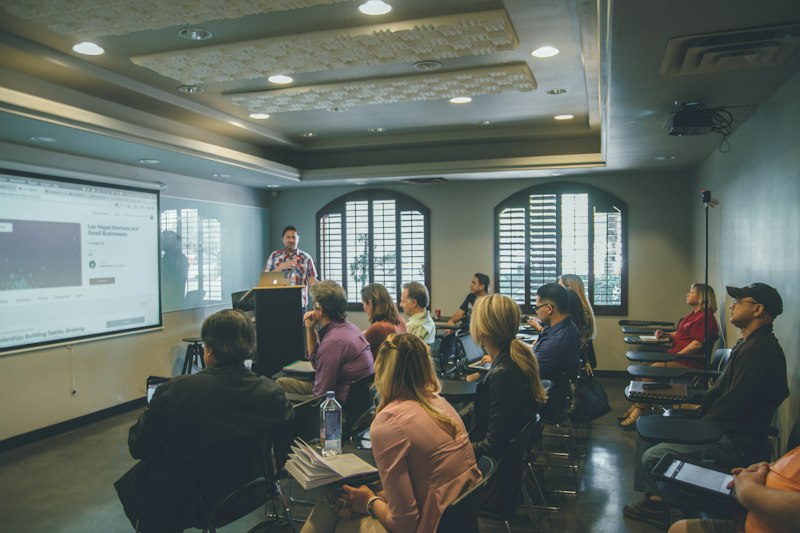
Learning spaces designed around comfort, not complexity.
Each workstation features adjustable seating, high-contrast keyboards, and screens positioned for easy viewing. We move at the pace of the learner — no rushing, no assumptions. Every 90-minute session maintains a 1-to-3 instructor ratio, ensuring personalized attention for every participant.
- EquipmentErgonomic setups with large monitors and tactile keyboards
- Class sizeMaximum 8 participants per session
- LocationLincoln Community Center, Learning Lab 3
Skills covered in week one

Patient instructors from all walks of life.
Our 38 volunteer mentors include retired educators, tech professionals, and compassionate community members — many of whom have parents or grandparents who benefited from similar programs. Each completes a comprehensive 3-hour orientation covering adult learning principles, common technology anxieties, and techniques for building confidence at any age.
- Volunteers38 active mentors this term
- Training3-hour orientation before first class
- Feedback4.8 / 5 average participant rating
She recognized the scam. Then she reported it.
"The message claimed my bank account was frozen. A year ago, I would have panicked and clicked. Instead, I checked the sender, spotted the red flags, and deleted it. I even reported it to my bank's fraud team."
— Patricia Miller, retired nurse, Seattle⚠ SUSPICIOUS MESSAGE
From: security-alert@myb4nk-verification.net
Subject: IMMEDIATE ACTION REQUIRED — Account Restriction
Dear Customer, your account has been temporarily restricted. Click here immediately to verify your identity...
Week 6: Digital Safety & Fraud Awareness
Participants learn to identify suspicious senders, recognize pressure tactics, and verify communications through official channels rather than clicking unknown links.

Building skills progressively.
No take-home assignments. No examinations. Just 90 minutes weekly of guided, hands-on exploration — until confidence grows.
Foundations
- Mouse navigation
- Keyboard basics
- Screen familiarity
Web Navigation
- Browser essentials
- Search strategies
- Bookmarking sites
Communication
- Email setup
- Writing messages
- Attachments
Video Connection
- Video calling apps
- Camera settings
- Scheduling calls
Online Services
- Banking basics
- Medical portals
- Government sites
Staying Secure
- Scam recognition
- Strong passwords
- Privacy basics
Life Skills
- Travel booking
- Navigation apps
- Ride services
Graduation
- Personal projects
- Practice session
- Certificate
Give someone the tools to connect.
Every contribution is concrete and directly tied to resources in our Learning Lab 3. Choose the level that resonates with you.
Share your time.
Transform a life.
You do not need a teaching credential or technology degree. You need patience and the willingness to answer the same question three times without frustration. We handle everything else.
38
Active volunteers
3h
Orientation only
4.8
Mentor rating
Learning Facilitator
3 hrs/weekGuide participants through exercises alongside lead mentors. No formal teaching background required — just empathy and basic computer familiarity.
Equipment Specialist
2 hrs/monthPrepare donated computers with accessibility settings, updates, and ergonomic configurations before each new session begins.
Support Line Assistant
2 hrs/weekAnswer calls from graduates with questions between sessions. Most inquiries are simple — a calm voice makes all the difference.
I taught high school computer science for years. I thought I understood every kind of learner. Then I watched a 78-year-old woman cry tears of joy when she successfully video-called her son overseas. That moment changed my perspective forever.
— Michael Torres, volunteer since 2021